



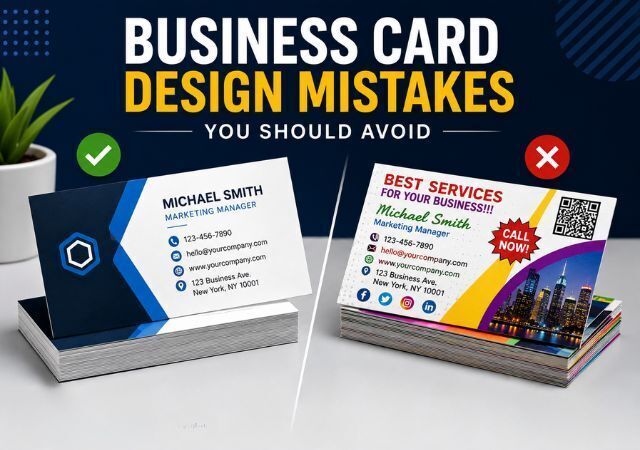
A business card is more than just a piece of paper with your contact information. It represents your brand, creates a first impression, and helps potential customers remember your business long after a meeting or networking event.
A well-designed business card can make your company look professional, trustworthy, and established. However, a poorly designed card can have the opposite effect. Cluttered layouts, unreadable fonts, low-quality images, and outdated information can make your business appear unprofessional and cause people to overlook your card.
Since business cards have limited space, every design element matters. Whether you're making business cards for the first time or updating an existing design, avoiding common mistakes can help you create a card that attracts attention, strengthens your brand, and leaves a lasting impression.
1. Adding Too Much Information
One of the most common business card design mistakes is trying to include too much information. While you may want to share every detail about your business, overcrowding the card can make it difficult to read.
Focus on the essentials:
Name
Job title
Company name
Phone number
Email address
Website
A clean and organized design makes it easier for people to find the information they need and improves the overall appearance of your card.
2. Choosing Fonts That Are Hard to Read
Fancy fonts may look attractive on a computer screen, but they often become difficult to read when printed.
Avoid:
Decorative script fonts
Extremely small text sizes
Using too many different fonts
Many businesses choose stylish fonts to stand out, but if customers struggle to read your contact information, the design has failed. When making business cards, readability should always come before creativity.
Choose clean, professional fonts that make your information easy to read at a glance.
3. Using Low-Quality Images and Logos
A blurry logo or pixelated image can instantly make your business look less professional.
Since your logo is often the most recognizable part of your brand, it should always be printed in high quality. Use high-resolution graphics or vector files whenever possible.
Sharp images help create a polished appearance and show attention to detail.
4. Ignoring White Space
Many people feel the need to fill every available space on a business card. However, overcrowded designs can overwhelm readers and make important information difficult to find.
White space helps:
Improve readability
Create visual balance
Highlight important information
Make the card feel more professional
A simple design with adequate spacing often makes a stronger impression than a crowded layout.
5. Using Too Many Colors
Color can help your business card stand out, but using too many colors can make the design look messy and unprofessional.
Stick to your brand colors whenever possible. A consistent color palette helps strengthen brand recognition and creates a cleaner design.
Remember, simplicity often looks more professional than an overly colorful card.
6. Forgetting the Standard Business Card Size
Many design problems occur because people don't understand the standard business card size before creating their layout.
In the United States, the standard business card size is 3.5 inches by 2 inches. Using the correct size helps ensure your card fits easily into wallets, card holders, and organizers while maintaining a professional appearance. Designing within these dimensions helps ensure your card fits comfortably into wallets, card holders, and organizers.
It is also important to leave proper bleed areas and safe margins to prevent important design elements from being cut off during printing.
7. Choosing Poor-Quality Card Stock
Even the best design can lose its impact when printed on thin or low-quality paper.
The quality of your card stock influences how people perceive your business. A sturdy card feels more professional, lasts longer, and leaves a stronger impression.
Investing in premium card stock can help your business stand out and demonstrate your commitment to quality.
8. Not Proofreading Before Printing
A simple typo can cost you valuable business opportunities.
Misspelled names, incorrect phone numbers, outdated email addresses, and broken website links can prevent customers from contacting you.
Before printing:
Double-check contact information
Verify website URLs
Review spelling and grammar
Confirm social media handles
It is also helpful to have someone else review your card before placing your order.
9. Printing QR Codes Without Testing Them
QR codes have become a popular addition to modern business cards because they provide instant access to websites, portfolios, online reviews, and contact information.
Unfortunately, many businesses forget to test their QR codes before printing.
Always scan your QR code on multiple devices before printing. A broken or incorrect QR code can frustrate potential customers and cause missed opportunities.
10. Ignoring Brand Consistency
Your business card should match the rest of your marketing materials.
Using different colors, logos, or fonts from those used on your website and promotional materials can create confusion and weaken your brand identity.
Consistent branding helps customers recognize, trust, and remember your business.
What Makes Good Business Cards?
Many business owners wonder what separates good business cards from average ones.
Good business cards typically include:
Clear contact information
Professional branding
Easy-to-read typography
High-quality printing
Strong logo placement
Balanced use of white space
The best business cards are simple, memorable, and easy to understand.
Common Business Card Printing Mistakes
Many people focus on design but overlook printing-related mistakes.
Some common printing mistakes include:
Using low-resolution artwork
Choosing the wrong paper stock
Ignoring bleed settings
Not requesting proof before printing
Using incorrect color settings
Avoiding these issues can help ensure your final product looks professional and matches your expectations.
Why Professional Printing Matters
Even the best business card design can suffer if it is printed poorly.
Professional printing helps ensure:
Accurate colors
Sharp image quality
Durable cardstock
Clean trimming
Consistent results
Working with an experienced printing company can help you achieve a professional finish that enhances your brand image.
Final Thoughts
A business card may be small, but it can make a big impact on how people view your business. By avoiding these common business card design mistakes, you can create a card that looks professional, strengthens your brand, and helps build valuable connections.
Whether you're using a business card sample, reviewing example business cards, or making business cards from scratch, focusing on quality, readability, and consistency will help your card stand out. At ABC Printing Company, we provide professional business card printing services to help businesses create cards that leave a lasting impression.
Frequently Asked Questions
What is the standard business card size?
The standard business card size in the United States is 3.5 inches by 2 inches.
What information should be included on a business card?
Most business cards include your name, job title, company name, phone number, email address, and website.
What makes good business cards stand out?
Good business cards combine professional design, quality printing, clear contact information, and consistent branding.
Can I use a free business card template?
Yes. However, it is important to customize the template so it reflects your brand and does not look generic.
Why should I review example business cards before designing my own?
Reviewing example business cards can provide inspiration, help you identify effective design elements, and prevent common mistakes.
